DanThornton

Tech, Geekery, Pop Culture, Miscellaneous

  • About Me
  • Gear
  • Contact
  • Cookie Policy
  • Privacy Policy

Investing In Some Home Office And Sim Racing Upgrades

July 17, 2023 By DanThornton Leave a Comment

I’ve been around the Amazon Prime sales long enough to be sceptical about any savings offered, checking the usual retail prices and avoiding last-minute impulse purchases. But investing in some home office and sim racing upgrades almost inevitably escalated a little bit…

First up, and the least exciting, was a new Belkin plug extension lead with some extra space, as six plugs isn’t enough for my PC and peripherals. So I picked up an 8 way extension lead, having used the same model for years behind my TV. I have no idea whether it’s particularly good or bad, but I’ve got three or four Belkin examples around the house with surge protection making me slightly less paranoid about issues.

One reason for the extra sockets was to plug in an RSHTech 7 port USB Hub so I could stop plugging and unplugging everything each time I wanted to switch peripherals. The good news is that each USB post has a light to show when it’s on, and an individual switch to turn it off when not needed. The bad news is that the hub comes with a plug which blocks the opposite socket on my new extension lead, which seems a bad design choice for a product which literally requires me to already have at least a PC and monitor running. How many wall sockets do they imagine I have to spare?

Investing in some home office and sim racing upgrades, including new pedals

This mean that I finally had to retire my 10 or 15-year-old Logitech PC speakers as the plug for them is the size of a small bungalow. So after skimming some quick reviews and recommendations, I plumped for some Creative Pebble V3s. And suddenly everything sounds a lot sharper, with much more clarity, as you might expect after waiting a decade or so to upgrade.

Swapping everything around meant spending most of a day unplugging and rearranging cables, so I also took the chance to give my PC and monitors a thorough clean. And it’s amazing how much difference some fairly cheap improvements, and some dirt and dust removal has made to my workspace. The PC is running much better (I’d been a bit lax in cleaning it for a while), the USB hub means less faffing with cables, my music sounds great, and cleaning my screens feels like I’ve upgraded to 4K Ultra HD for my eyes…

The other investment was in some Thrustmaser T-LCM loadcell pedals for my sim racing set-up. Because there’s no point working hard if you can’t treat yourself occasionally, and for under £200, they’re probably the best upgrade you can make for a more realistic virtual driving experience. And now I should be more accurate with my braking, and the magnetic sensors should be they last, and stay accurate, for absolutely ages…

It’s been pretty much 12 months since I last spent anything on upgrades…

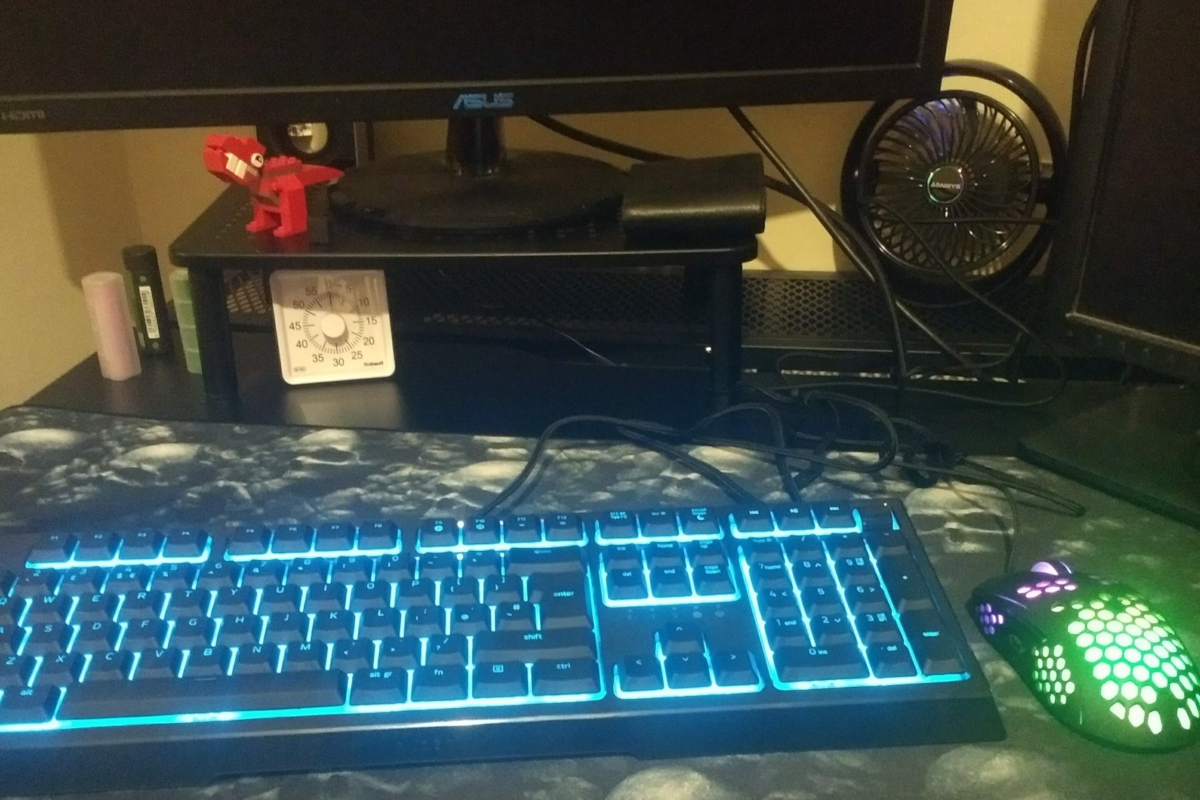
As a quick update, I’m still loving my Razer Ornata V2 keyboard, and it’s coming up for a year of hammering out thousands of words each day without any issues so far *touches wood*. The only occasional bug is that I sometimes have to unplug and reconnect the USB cable if the lights don’t ride up (a gentle blue glow is handy when it’s darker in the office).

The cost-effective Trust GSXT960 mouse has lasted longer than I expected and is still working fine, although I’ve started experiencing the occasional double-clicking, so hopefully a thorough cleaning will have sorted that. And having a massive desk mouse pad and some cleaning products has definitely kep my desk and equipment in much better condition.

Share this:

  • Share on Facebook (Opens in new window) Facebook
  • Share on X (Opens in new window) X
  • Share on Pinterest (Opens in new window) Pinterest
  • Share on Reddit (Opens in new window) Reddit
  • Share on LinkedIn (Opens in new window) LinkedIn
  • Share on Tumblr (Opens in new window) Tumblr
  • Email a link to a friend (Opens in new window) Email

Filed Under: Gadgets, Life Tagged With: gadgets, Home office, home working, Remote working, Sim racing, working from home

Investing in my home workspace…

August 8, 2022 By DanThornton Leave a Comment

One of the biggest challenges in being self-employed can be spending money where it makes sense. So seeing as I’ve been investing in my home workspace recently, I wanted to share some of the purchases which have made a noticeable difference. Whether that’s productivity, or just having an enjoyable space to work in.

Most noticeable are the new Razer Ornata V2 Keyboard and Trust GXT 960 Gaming Mouse, as they both contain more lights than most town centres at Christmas. But I had some sensible reasons for buying each upgrade, besides making my work desk look like a 14-year-old Fortnite addict has taken residence.

Investing in my home workspace...
Investing in my home workspace…

Despite investing in a desktop PC for both work and sim racing, I’d been relying on the same old keyboards and computer mice for years. Whenever one stopped working, I’d look through old storage boxes and just grab whatever had been accumulated over the years. Even after writing articles about the importance of ergonomics for the health of deskbound freelancers, and switching to a trackball for a time due to wrist and RSI issues.

So the main attraction of the Razer Ornata V2 was that it’s a stepping stone to investing in a high end mechanical keyboard. And the ‘mecha-membrane’ technology means it’s a halfway house which was reasonably ergonomic, and some reviews mentioned it was pretty good for touch typing.

After using it for a month, it’s much more comfortable and enjoyable to type with compared to a cheap keyboard. And after installing the bloatware to control the lighting, I’ve found a nice cyan which helps me work in low light reasonably effectively, rather than distracting myself with the various effects available. Although when I do finish for the day, I’ve enjoyed some of the interactive light effects available in some games.

Aside from the feel of the keys, the built-in volume and mute control is handy to avoid me having to reach around monitors to access my desktop speakers, especially if I’ve got a call or meeting at short notice.

It comes with a wrist rest, which is fine, and has held up OK so far. Although I’ll be interested to see how it handles 12 months of heavy-handed typing.

The Trust GXT960 mouse was bought at the same time, and not for the RGB lighting. So far, I haven’t been motivated to actually install the software needed to change from the default rainbow pattern, and I’ve pretty much learned to ignore it.

Instead, it was purchases between it’s lightweight with a honeycomb shell which helps to keep my hands cool and comfortable. And it’s reasonably sized for someone with fairly small hands. My old mice were getting increasingly clunky and inaccurate, even after a thorough cleaning. And so far the optical sensor and low-friction pads have kept it smooth and accurate for work and occasional gaming.

Underneath both is a Titanwolf XX Speed Gaming Mouse Pad. Which is a cheap upgrade I can’t recommend enough. No more struggling to stay on a tiny mouse pad, or risking picking up dust and rubbish from a desktop.

I’ll admit I picked the skull design for the goth/metal aesthetics, but it’s also one of the more subtle choices. And honestly, it’s made a huge difference to be able to use my whole desk space as a mouse pad. I’m not trapped into the same repetitive movements when I’m working, which definitely helps with wrist aches and strains.

The final indulgence was an OXO Good Grips laptop cleaner (not pictured). You can find something similar for less, but it’s handy and comfortable to use. It’s easy to put off the hassle of a thorough clean with microfibre cloths, compressed air and a service of the desktop PC case, so it’s perfect for a quick wipe down every so often. Mine came bundled with a single brush at the time, which is good for phones or other smaller electronic gadgets, and has inspired me to take a bit more pride in my home office.

Also pictured alongside a selection of back-up batteries for vaping are a LEGO dinosaur from my girlfriend, who also bought me the Pomodoro timer. And she’s also the absolute genius who invested in some Aonbys USB fans at the first news of a heatwave in the UK. Mine’s been permanently plugged in and whirring away quietly for a while and kept me from going insane during the hottest weather.

Another couple of cheap investments were a basic monitor stand and desk footrest. Again, both have made a big difference in how comfortable it can be to spend a lot of time at my computer, and I’ve noticed a reduction in neck and back aches as a result. If you’re working from home, it’s definitely worth considering both to improve your ergonomics rather than living with joint pain…

Nothing listed above is particularly prestigious or expensive. The keyboard was the biggest investment, but it’s dirt cheap compared to high-end mechanical examples. But it’s reminded me how important it is to occasionally treat myself to practical and fun upgrades to make work, and play, more enjoyable.

Share this:

  • Share on Facebook (Opens in new window) Facebook
  • Share on X (Opens in new window) X
  • Share on Pinterest (Opens in new window) Pinterest
  • Share on Reddit (Opens in new window) Reddit
  • Share on LinkedIn (Opens in new window) LinkedIn
  • Share on Tumblr (Opens in new window) Tumblr
  • Email a link to a friend (Opens in new window) Email

Filed Under: Life, Work Tagged With: home working, working from home

Working from Home vs the Office

February 25, 2013 By DanThornton 4 Comments

The internet has been up in arms since a memo revealed Yahoo employees will no longer be allowed to work from home. That includes those who may have arranged to work from home 1-2 days a week as well as remote workers.

I spent several years working in an office, including a period split between office and remote working, before finally starting my own business, which has run from my dining room both as an advantage for clients (no office means lower costs), and a necessity when I started out bootstrapping my company.

Working from home

Having looked at various studies, and the experiences of friends alongside myself, I’m a big believer in being able to work flexibly, whether or not that includes working remotely. And here are some reasons why:

  • Social Interaction is important to humans: But who says that all the great insights into work come from social interactions with colleagues? And not family, friends, meeting random strangers etc? Not to mention events like #DPIP, or being able to chat whilst out during a walk rather than in a meeting room.
  • It’s not Either/Or: In an average week of ‘working from home’ I spent 2 days working alone by myself, 1 day in a client office, and 2 days with one of my colleagues from TheWayoftheWeb sharing my home office. That’s a pretty healthy mixture between social interaction and the ability to concentrate. And not wear trousers if I don’t want to.
  • I can still have meetings: Expanding on the above – where suitable I’ll happily attend any meeting/brainstorm/planning session etc. All it means is that I’ll not be around beforehand or afterwards, unless there’s a beer involved.
  • Getting more from breaks: Working in an office means that breaks tends to involve smoking, grabbing a snack or sitting around, and aren’t always the amazing watercooler moments of insight you might imagine. Whereas working from home means breaks can include putting washing in the machine, doing the washing up whilst listening to a podcast and other manual tasks which mean I can let my mind relax as recommended in every guide to creativity, but also avoid spending all my nights cleaning up. Which means I can work later if required, or spend time learning something new.
  • Getting more from me: There’s no shortage of time tracking and project management tools to show whether I’m working or idly surfing cat videos on Youtube. And at the end of the day it’s very simple – I don’t deliver the agreed work, and I don’t get paid.
  • Memory Bias: It’s great to remember that evening before launch when the whole team was in the office, hopped up on pizza and caffeine to meet a big deadline. Or that time someone had an amazing insight in a meeting and we all added more to it until it became the most awesome solution to a problem ever invented.
    Because why would you want to remember the other 300+ days of the year spent sat in a meeting room because everyone else was late, or spent trapped in a pointless debate about something irrelevant. Or spent sat in a queue in a car park to get in for 9am and out for 5.30pm, after standing in a line at 1pm to grab a sandwich to eat alone at your desk?

I’m not suggesting everyone should work from home. Or in an office. But it’s hard to rationally understand why I’m going to be more productive or creative in a room full of people away from a comfortable chair, my favourite music, my choice of food etc? Or why it’s better for me to be in rush hour traffic, standing on a commuter train, or trapped in a packed shop at lunchtime?

I like offices. I actively look forward to those days when I’m meeting or working with clients. But I appreciate it more when it’s not something enforced on me every day.

Share this:

  • Share on Facebook (Opens in new window) Facebook
  • Share on X (Opens in new window) X
  • Share on Pinterest (Opens in new window) Pinterest
  • Share on Reddit (Opens in new window) Reddit
  • Share on LinkedIn (Opens in new window) LinkedIn
  • Share on Tumblr (Opens in new window) Tumblr
  • Email a link to a friend (Opens in new window) Email

Filed Under: Business Tagged With: flexible hours, home working, office working, working from home

Dan

Sidebar Profile Founder at TheWayoftheWeb and Hot Mod Media. Go there for Content, Marketing and Business. Co-founder, Digital People in Peterborough and dogsbody at Peterborough STEM Festival. Stay here for more personal stuff, pop culture, and other loosely related cool stuff. More about me.

Social Dan

  • Flickr
  • Instagram
  • LinkedIn
  • Mastodon
  • Medium
  • Pinterest
  • Twitter
  • Vimeo
  • YouTube

Get Interesting Stuff by Email

Subscribe to the Email of Interestingness + more info

Or take a chance and stick your email in the box below...

powered by TinyLetter

Top Posts

  • Metronidazole And Vaping - Check Your Medicines

Goodreads

Creative Commons License
DanThornton.net by Dan Thornton is licensed under a Creative Commons Attribution-NonCommercial-ShareAlike 3.0 Unported License.
Based on a work at www.danthornton.net.

© 2026 Dan Thornton · Content & Marketing TWOTW · Niche Publishing HotModMedia Mastodon